This workflow automates the creation of short gen AI videos from prompts stored in a
Google Sheet. It generates an image using Hugging Face FLUX, converts the image into a short video
using RunwayML Gen-3 Turbo, waits until the rendering is complete, downloads the generated
video, and stores it locally.
The gen AI shorts are them assembled into a single video,
with an automated narration created with the TTS (text-to-speech) module in Python added to the final video.
The workflow performs the following operations:
The snapshot below shows the complete workflow inside n8n.
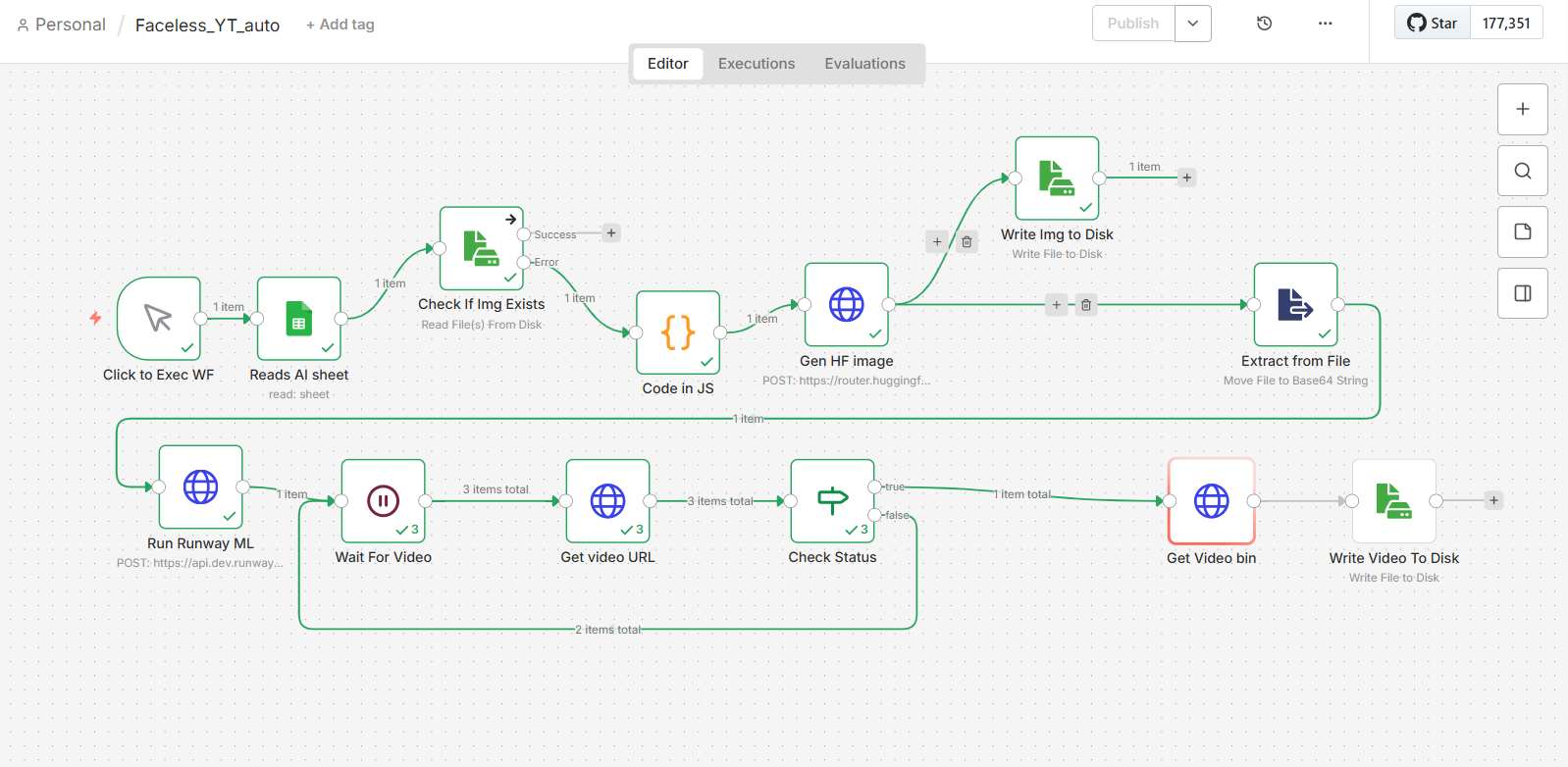
Starts with a manual trigger, for more control. Starts the WF with a user input (step number) through an n8n form.
Looks up the corresponding row in a Google Sheet using the supplied sequence number and retrieves the prompt to be used for image generation (this node can be manually configured for touch-ups).
Attempts to read the expected image file from disk. If the image already exists, image generation is skipped. Otherwise, the workflow generates a new image.
Extracts the prompt from the Google Sheet and prepares it for the subsequent API calls.
Uses the Hugging Face inference API (FLUX.1-schnell) to generate an image from the prompt.
Stores the generated PNG image locally.
Reads the image and converts it into Base64 so it can be submitted to the RunwayML API.
Sends the Base64 image together with the prompt to RunwayML Gen-3 Turbo to generate a short video (user credits needed).
Introduces a delay before checking whether the video generation has completed.
Queries the Runway ML task endpoint to obtain the current rendering status.
Determines whether rendering has completed. If not, the workflow waits again and repeats the status check.
Downloads the finished video once Runway ML reports that rendering has succeeded.
Saves the generated MP4 video to the local disk.
You can download the workflow here:
POV_YT_n8n_WF-No_Secrets.json
If you use it, please credit me.
For security reasons the RunwayML API key has been removed from the shared workflow.
Replace the placeholder
Bearer YOUR_RUNWAYML_API_KEY
with your own RunwayML API key before running the workflow.